Lights, Materials, and the Sphere That Wasn't There
Lambert and Phong, directional and point and ambient lights, a std140 LightBlock, and six hours of debugging an invisible sphere because I wound every triangle the wrong way.
Everything up to this post has been flat colour. An UnlitMaterial takes an RGBA value and paints every pixel with it. A Box next to a Sphere looks like two identical silhouettes, because without a shading model there’s no cue about which surface is facing where. The demo graph is spinning, and I can tell that because of the silhouette, but I couldn’t tell you if the sphere is convex.
This is the post where the demo graph stops looking like 2013.
Two new plugins
lux-scene-material adds two material nodes:
- LambertMaterial. Diffuse colour. Classic
N·Ldiffuse term, no specular, no highlights. The cheapest shading model that actually looks like three dimensions. - PhongMaterial. Diffuse colour, specular colour, shininess. Standard Blinn-Phong highlight on top of the Lambert term. Not physically based, but correct enough that a sphere looks round.
lux-scene-light adds three light nodes:
- DirectionalLight. Direction, colour, intensity. The sun. Parallel rays, no falloff.
- PointLight. Position, colour, intensity, attenuation. A bulb in space. Inverse-square falloff with a small constant to keep the math sane at zero distance.
- AmbientLight. Colour, intensity. The cheat. Not physically meaningful, very useful for “my shadows are too dark and I don’t feel like writing a GI pass yet.”
RenderScene gets a new lights input that accepts a Spread<Light>, capped at eight because the shader’s uniform block carries exactly eight slots. Wire one light or wire all eight, whichever you have patience for. A ninth light gets silently clipped at aggregation time.
The LightBlock dance
Getting lights into the shader turned out to be more work than getting the shading math right, and it’s worth walking through because the pattern will show up again in every future post that adds a uniform.
A Light in the shader has to match a specific memory layout, because std140 is the std140 and wgpu will happily misalign your data and give you zero visual feedback about it. The layout I landed on:
struct Light {
    position_type: vec4<f32>,     // xyz = position, w = light-type tag
    color_intensity: vec4<f32>,   // rgb = colour, a = intensity
    direction_range: vec4<f32>,   // xyz = direction, w = range
    params: vec4<f32>,            // xy = attenuation, zw = reserved
};

struct LightBlock {
    count: u32,
    pad0: u32,
    pad1: u32,
    pad2: u32,
    lights: array<Light, 8>,
};
Four vec4 per light is 64 bytes, times 8 = 512 bytes of lights. Plus the 16-byte header (count plus three explicit u32 pads, because std140 wants the array that follows to start on a 16-byte boundary and writing the padding as three separate u32 fields is the least confusing way to make naga agree with me). Total, ~544 bytes once the trailing pad is accounted for. I wrote that out by hand on the back of an envelope because the first time I let Rust pick a layout via #[repr(C)] it came out different from what the shader expected, and a cube showed up dark purple for reasons that took me ten minutes to admit had nothing to do with the math.
Binding: @group(2). Group 0 is per-frame (view + projection). Group 1 is per-draw (model matrix, material constants, dynamic offset). Group 2 is per-scene lights. The three bind groups let me re-bind only what’s changing: frame once per scene, draw once per draw call, lights once per scene.
One naga_oil quirk worth pinning down here: I had the Light and LightBlock structs in a separate lux::lights shader module and imported them into mesh.wgsl via #import lux::lights::{Light, LightBlock}. The shader compiled fine. The binding did not work, because naga_oil mangles the names of imported types when they get used as binding types, and wgpu’s reflection couldn’t find the block. The fix was to inline both structs into mesh.wgsl directly. Still imports the math helpers from lux::lighting; just stops trying to import the types. Unceremonious but effective.
One shader, three material classes
Up until now there was a separate unlit.wgsl for the unlit path. I was about to write lambert.wgsl and then a phong.wgsl, and I stopped myself long enough to notice that all three material types have identical vertex paths and 90% identical fragment paths. The only thing that really changes is the shading function in the fragment shader.
So there’s now a single mesh.wgsl with three shader-def branches selected at compile time by naga_oil:
#ifdef MATERIAL_UNLIT
    return draw.diffuse;
#else ifdef MATERIAL_LAMBERT
    return lambert_shade(normal, draw.diffuse);
#else ifdef MATERIAL_PHONG
    return phong_shade(normal, view_dir, draw.diffuse, draw.specular_shininess);
#endif
The mesh_pipeline_cache now keys its entries on a MaterialClass enum (Unlit, Lambert, Phong), and at pipeline-compile time it passes the right #define to the shader compiler. Three material classes × one vertex layout = three compiled pipelines, not three shader files. Adding a BlinnPhongWithFresnel later is a one-line addition to MaterialClass and a new #ifdef branch in the shader, not a new file.
DrawUniforms grew from 64 bytes to 128 bytes (model matrix, diffuse colour, specular + shininess packed into one vec4, and a flags word for future material switches) and is now uploaded through a dynamic-offset uniform buffer so all draws in a frame share one allocation and just pick their entry with an offset. Standard technique, should have been there from the start, is in here now.
The sphere that wasn’t there
Everything above is infrastructure. This section is the hero bug.
I wired up the full pipeline, Sphere → LambertMaterial → RenderScene(DirectionalLight, PerspectiveCamera), set the camera to look at the origin, pointed the light at the sphere, and hit run. The screen was empty. Not “the sphere is black” empty. Not “the light is pointing the wrong way” empty. No sphere at all.
First theory: the sphere is outside the view frustum. Logged the camera’s projection, logged the sphere’s bounds, did the math. The sphere is at the origin, the camera is at (0, 0, 5) looking at the origin, the near plane is 0.1 and the far plane is 100. The sphere is in the frustum. Moving on.
Second theory: the light is on the wrong side, so the sphere is drawing, just entirely in shadow. Swapped to UnlitMaterial. Screen still empty. So not a lighting bug. The sphere is not reaching the rasterizer at all.
Third theory: the sphere’s mesh is empty. Added a log line in Sphere::process(). Mesh has 625 vertices, 3456 indices at the default 24-segment subdivision. Not empty.
Fourth theory: the pool isn’t storing the mesh. Logged the pool state. Mesh is there, handle is live, vertex and index buffers are allocated to the right sizes.
Fifth theory: the draw call isn’t running. Added a log in render_3d::execute. Draw call is running. 3456 indices, one pipeline, depth test passing.
Sixth theory, and this is the one where I had to stop and draw a picture: maybe the triangles are facing the wrong way. Backface culling is on. If every triangle has its normal pointing into the sphere, then from the camera’s point of view every triangle is a back face, and wgpu culls all of them, and you see nothing except the clear colour. Which is exactly what I was seeing.
I opened mesh_builders::sphere and looked at the triangle emission loop. For each quad on the sphere, it was emitting two triangles:
indices.extend_from_slice(&[a, c, b, b, c, d]);
Viewed from outside the sphere, at the default subdivision, this is clockwise. CCW is the “front” per the pipeline. So every triangle was a back face. Every back face was culled. The sphere was drawing entirely “inward.” If you could climb inside it and look around, you’d see it rendered perfectly, Lambert-shaded, backlit by the directional light. From outside, nothing. The sphere was there. You just couldn’t see it from any angle anyone would actually use.
The fix was embarrassingly small:
indices.extend_from_slice(&[a, b, c, b, d, c]);
Three letters swapped. The sphere appeared. I then spent ten additional minutes verifying that the demo graph from the last post still looked correct, because I was now deeply suspicious that every other primitive might have the same bug. Box was fine; I’d apparently lucked into the right winding when I wrote it. Plane was fine. Grid is a line list so winding is meaningless for it. Sphere was the only one I’d got backwards, which made me feel exactly as smart about the Sphere as about the Box.
The real lesson, the one I’m writing down so future-me can point at it: when a render target comes back all-clear-colour, check backface culling before you check the lighting math. The math is fiddly and hard to verify; the winding is a three-letter change. Start with the cheaper hypothesis.
What it feels like
The demo graph is now Sphere → PhongMaterial → Transform3D → RenderScene(DirectionalLight + AmbientLight, PerspectiveCamera, OrbitControls). I can orbit the camera around the sphere. The directional light rakes across the top of it, the ambient fills in the shadow side, and the Phong highlight is a bright spot on the upper-left hemisphere that moves as I orbit. It is, unmistakably, a sphere.
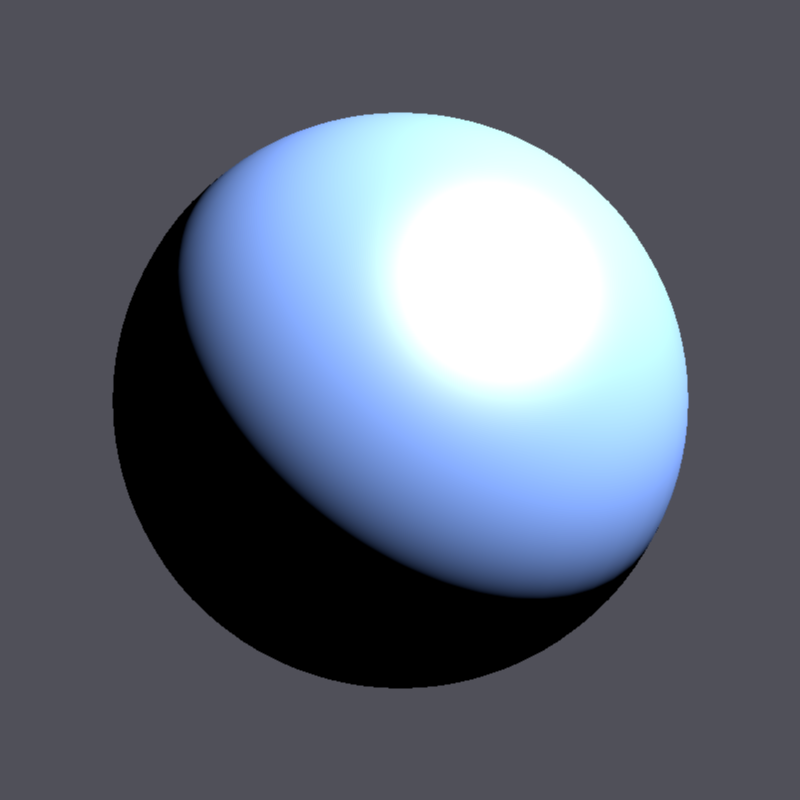
That’s the first time in ten months of Lux development that something on my screen looked like a rendering of a thing instead of a proof that a thing could render.
Next post is where we start rendering 10,000 things at once. Materials and lights are cute; instancing is where it gets fun.