When Transparent Means Transparent
The 2D Blend and Composite nodes now follow the actual compositing spec, so a transparent layer stays out of the way, a Multiply looks like a Multiply, and half-opacity means half, not all. Group and Merge get a blend mode pin, and a blended group finally minds its own business.

Stacking layers is the most basic move in any visual tool, and it is the one you never want to think about. You drop a glow over a plate, pull its opacity down, and it should just recede. Feed a mask into a Composite and the covered part shows, the rest does not. This is the kind of thing that has to be boring to be good.
Under the hood it was not boring. The Blend node’s “Normal” mode was throwing away the top layer’s alpha entirely, so a fully transparent layer would happily paint straight over everything below it. Composite had the mirror-image bug: it lerped by the mask alone and ignored the foreground’s own coverage, so a clear foreground still wiped out the background wherever the mask was open. And all of it happened on encoded 8-bit values rather than in premultiplied linear light, which is a fancy way of saying the colors were quietly wrong even when the alpha behaved.

That image is the fix doing its day job: an opaque orange foreground composited over a blue backdrop through a radial mask. The center is full foreground, the edges fall back to the backdrop, and the ring between them is a real source-over blend rather than a hard cutout. Nothing dramatic, which is the point.
The spec, ported straight
Both nodes now follow the W3C Compositing and Blending Level 1 formulas to the
letter: premultiply, apply the per-channel blend function, mix back over the
backdrop by its alpha, and composite source-over. Multiply is A×B, Screen is
A+B−A×B, and Normal is honest source-over that respects both layers’ alpha.
These are not numbers we tuned until a picture looked right. They are the
spec’s own arithmetic, which means the tests can check the rendered pixels
against values computed by hand:
- a transparent foreground leaves the backdrop untouched, to the byte
- a half-opacity red over blue lands on purple
(128,0,128), not pure red - Multiply and Screen match the spec formula across a probe grid

If the math drifts, those checks fail by tens of codes, not a subtle shade. No eyeballing, no golden image to quietly reseed.
Blend modes, on layers, where you actually want them
The same spec now drives the vector layer path. Group and Merge each grew a
blend pin, so you can set a stack to Multiply or Screen right in the canvas
and get the same answer the texture graph would give you. Twelve modes, straight
through to the rasteriser.
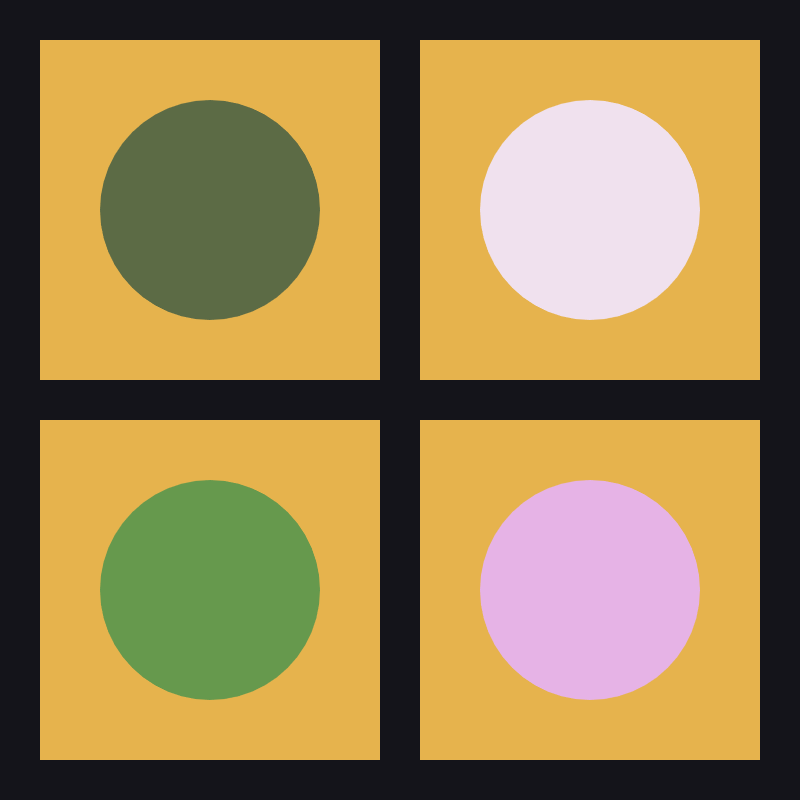
One rectangle, one circle, four modes. Multiply darkens, Screen brightens, Darken and Lighten pick the loser and the winner channel by channel, which is why the bottom two swing green and pink rather than landing somewhere polite in between.
The subtler half of this is what a blended group does not do. Set a group to Multiply and it should mix against the layers inside it, not against whatever happened to be sitting on the canvas behind it. Before this, it grabbed the entire accumulated frame as its backdrop, so dropping an unrelated background behind your group would reach up and change its colors. Groups are isolated now, per the spec: what happens in the group stays in the group.
What is next
Its neighbor shipped alongside it: the 2D chain now carries floating-point precision node-to-node, so heavy filter stacks stop banding and highlights above white survive the trip. That one got its own post. For now, transparent finally means transparent.